
Your PC crashes? Stabiro finds out why.
Stabiro watches over your PC. The day something goes wrong, it tells you why, in plain words, and fixes it with your consent. Blue screens, sudden reboots, freezes: no expertise needed, and every fix can be undone.
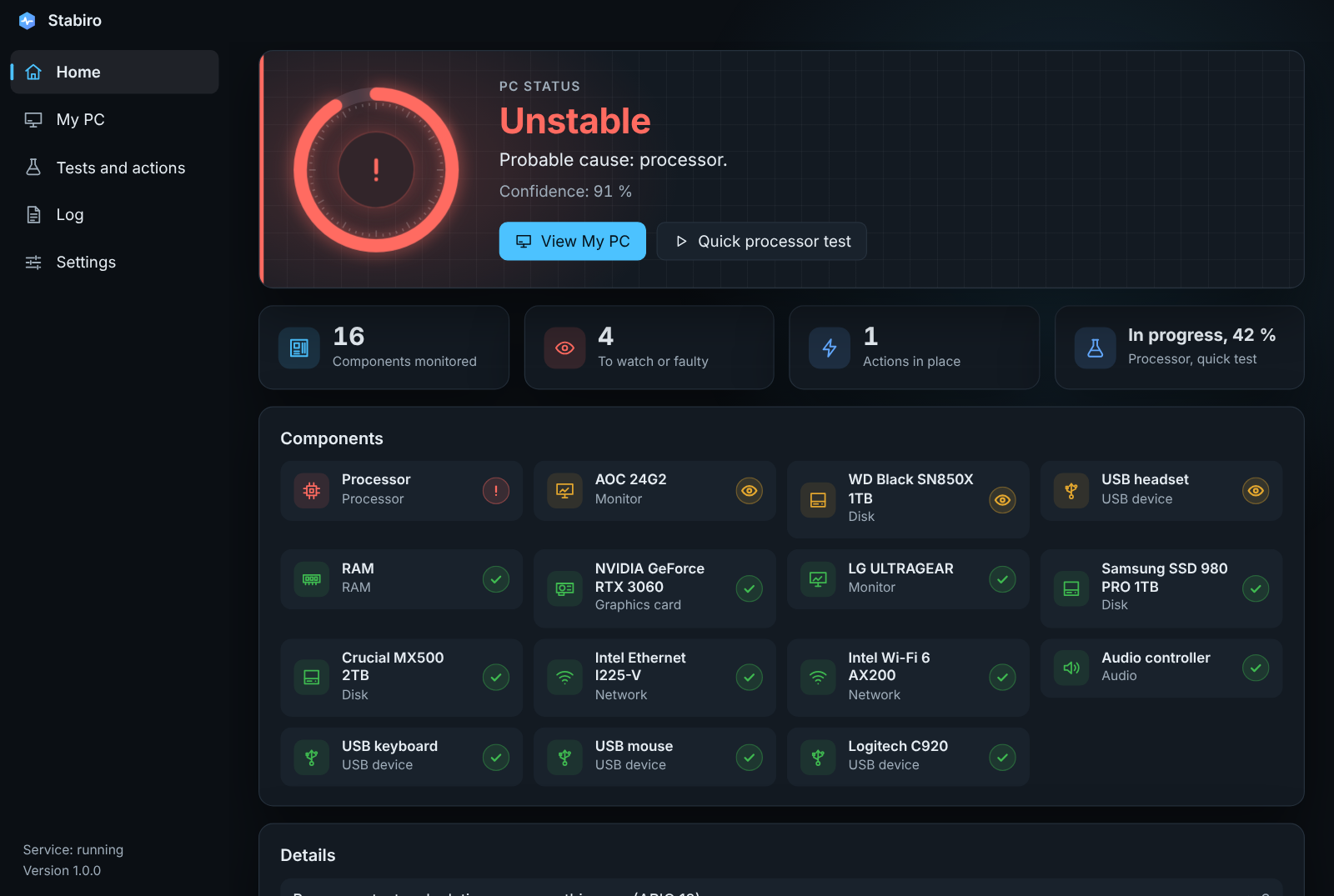
From diagnosis to fix, without breaking anything.
Stabiro is not a “cleaner” promising a faster PC. It is a diagnosis and stabilisation tool: it tells you what is wrong, on which part, how confident it is, and what can be done about it.
The cause, not just the symptom
Crashes, reboots, blue screens, freezes: Stabiro cross-checks Windows logs, sensors and the device tree, and names the likely cause with its confidence: power supply, processor, memory, graphics card or driver, disk, peripheral, software. The analysis runs on SNL, Stabiro's in-house engine, which compares each measurement with what is usual on your PC, locally.
Active tests, no reboot
Processor core by core, RAM (physical pages), graphics card memory and compute, page file configuration: the tests run inside Windows, with no external tool and no reboot, and stop whenever you want.
Your PC, part by part
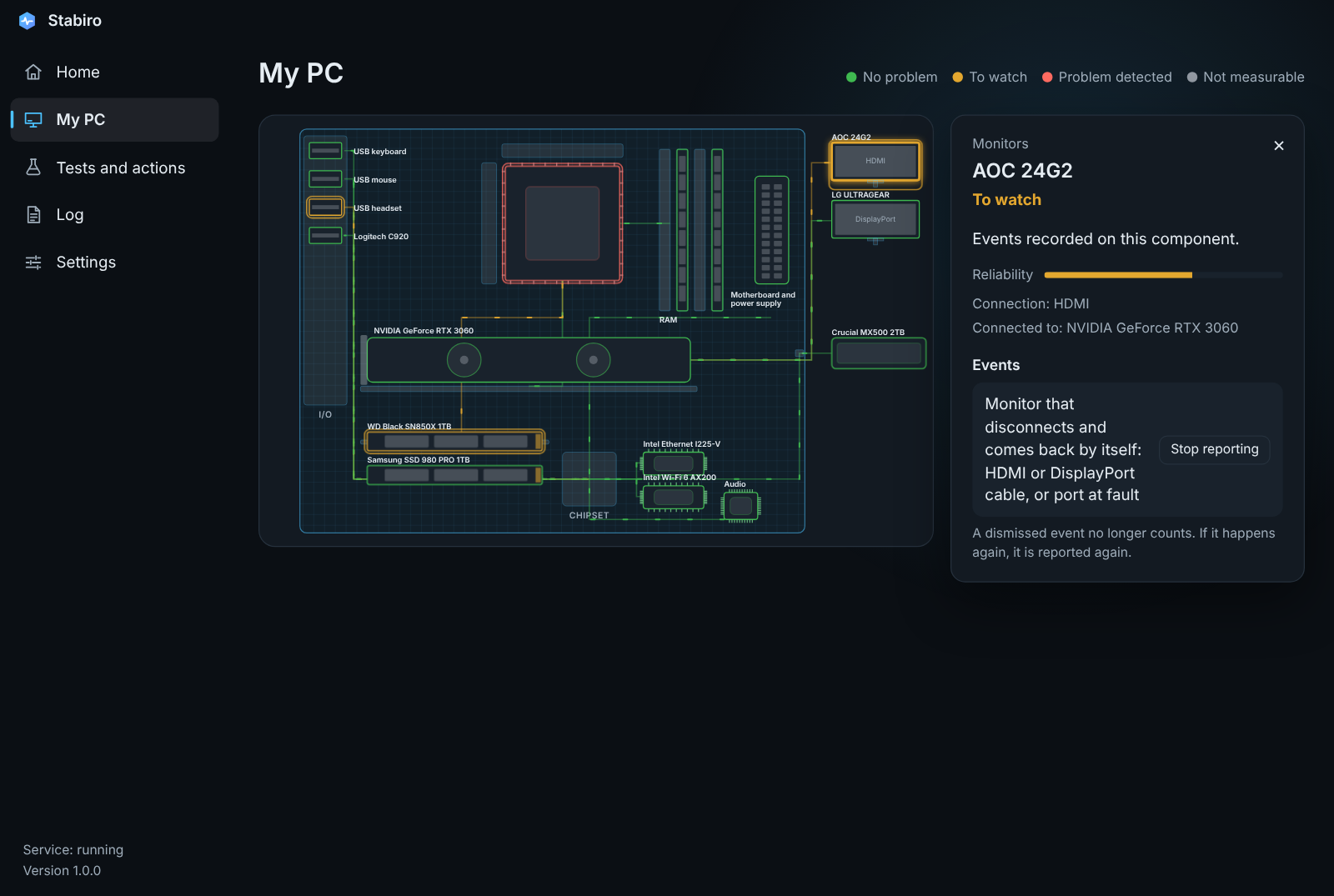
A diagram of the motherboard with every component where it is mounted. Each part has its colour, its events and its link; zooming in shows the inside of the chips and where the test is working, live.
Bad connections
PCIe link slower than expected, transfer errors on the SATA cable, USB 3 device running at USB 2 speed, unrecognised USB device, Ethernet at 100 Mbit/s on a gigabit card, HDMI or DisplayPort monitor that keeps dropping out.
Actions, with your consent
Limit processor boost, disable USB/PCIe power saving, set aside a faulty memory area, disable a device that causes crashes, delay a program at startup. Every action is proposed, explained, and waits for your consent.
Everything is reversible
Before each action, the state is saved; after it, it is verified. An action is undone in one click, even after a subscription ends. The action log keeps a record of everything.
Missing drivers, from official sources
A device without a driver is flagged, with its hardware reference. One button opens Windows Update or the Microsoft Update Catalog, which only publishes WHQL-certified drivers.
Disk space, safely
Cleanup within clear limits, never in your personal folders, a list of the heaviest folders, and moving a large folder to another drive with checks before and after, and the reverse operation. Steam and Xbox go through their own move tool.
100% local
The diagnosis runs on your PC and stays there. No account, no telemetry. The licence is checked once a day; after the trial, the free diagnosis never contacts a server.
Everything Stabiro does.
Continuous diagnosis
- Blue screens, sudden shutdowns and reboots, freezes.
- Programs that crash or stop responding, named in the log.
- Graphics driver resets, disk errors, hardware errors reported by the processor, overheating and throttling, memory running out.
- The likely cause, with its confidence and what supports it: power supply, processor, memory, graphics card or driver, disk, peripheral, software.
- A Windows notification when something new happens, and a “Fixed” button once you have solved it: if it comes back, Stabiro reports it again.
Your PC, part by part
- Motherboard diagram with the processor, each RAM stick, graphics card, disks with their drive letters, network and audio.
- Monitors with their connection (HDMI, DisplayPort), which one is the main display and where it sits.
- USB and Bluetooth devices (connected or only paired), front panel ports, audio jacks plugged or free.
- For each part: its state, its events, its PCIe link, its driver and whether that driver is unstable.
Hardware tests, no reboot
- Quick PC test (a few minutes) or all tests in full (about twenty minutes).
- Processor core by core, then all together.
- RAM, quick or full; and the Windows Memory Diagnostic at restart, which sees all of the memory, with its result read by Stabiro.
- Graphics card: compute, video memory, or both.
- Page file configuration, and audio latency for music, streaming and calls.
- Every test changes nothing on the PC and stops whenever you want.
Cables and connections
- Ethernet cable test against your router, and USB drive test (written, read back, compared, deleted).
- SATA cable transfer errors, PCIe link slower than expected, USB 3 device running at USB 2 speed.
- Unrecognised USB device, Ethernet at 100 Mbit/s on a gigabit card, monitor that keeps dropping out.
Fixes, with your consent
- Limit the processor boost, turn off USB and PCIe power saving.
- Keep programs off a faulty processor core, set aside a faulty memory area.
- Disable a device that causes crashes, delay a program at startup.
- Emergency stabilisation: for a PC that keeps crashing, Stabiro applies on its own, one at a time, only the actions you chose in advance.
- Each action is explained, waits for your consent, is checked afterwards and is undone in one click.
Disk space
- Cleanup of five clear categories: old temporary files, shader caches, installed Windows Update downloads, old crash dump files, setup logs. Never your personal folders.
- The heaviest folders of each drive.
- Move a heavy folder (a game, videos, a project) to another drive: each file is copied then checked, the original is only removed afterwards, and a link stays at the old place so programs keep finding it. One click moves it back.
- Steam and Xbox games go through their own move tool.
Drivers
- A device without a driver is flagged with its hardware reference.
- One button opens Windows Update or the Microsoft Update Catalog (WHQL-certified drivers only).
- A driver that keeps failing is marked unstable on its part.
Log, alerts and updates
- A log of everything: each action, each consent, each test result and each Windows event, in plain words.
- Windows notifications: all, important ones only, or none.
- An icon next to the clock, and a window that opens only when you want.
- Automatic updates, signed and checked before they install.
Your privacy
- Everything runs on your PC: no account, no telemetry.
- The content of your files, your keystrokes and your screen are never read; hardware serial numbers neither.
- Only the licence is checked online, once a day, during a subscription.
Stabiro speaks 19 languages.
The window, the notifications and the installer follow the language of Windows; you can change it in Settings.
- English
- Français
- Deutsch
- Español
- Italiano
- Português (Brasil)
- Nederlands
- Polski
- Čeština
- Svenska
- Dansk
- Türkçe
- Русский
- Українська
- Bahasa Indonesia
- 日本語
- 한국어
- 简体中文
- 繁體中文
A software neuromorphic substrate, not today's AI.
Stabiro does not run on a language model or on today's AI. It runs on a software neuromorphic substrate: it does not merely imitate neurons, it simulates their activity, and a conclusion only emerges when several independent sources agree.
Proprietary technology, exclusive property of David Maus.
Every component, where it is mounted.
No magic promises
No “+40% performance”. A likely cause, a displayed confidence, and what supports it.
Nothing without your consent
An action is proposed and explained before it is carried out. Emergency measures only cover a closed list, agreed in advance.
No kernel driver
A Windows service and an unprivileged window. No third-party driver, no change to the boot process.
Your files stay yours
The content of your files, your keystrokes and your screen are never read. Hardware serial numbers neither.
7 days to try everything. Then the diagnosis stays free.
7-day trial
Every feature: details, active tests, actions, emergency stabilisation. No card, no account.
Free, forever
The overall state of the PC, the colour of each part on the map and the summary sentence.